
Infrastructure dashboard
Infraestructura > Panel (Infrastructure > Dashboard) is not in the menu by default (Menus per Client).
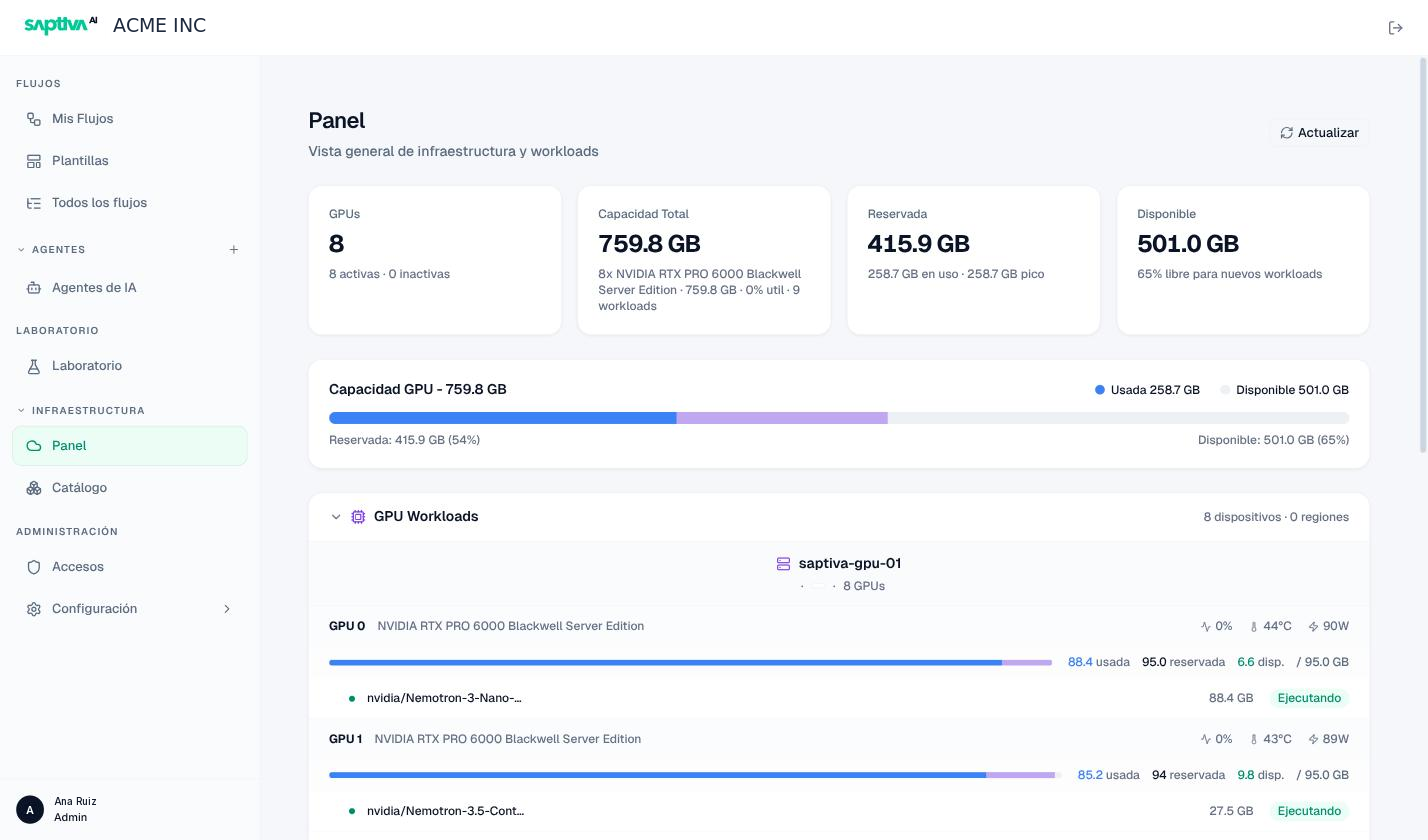
The Panel (Dashboard) shows the state of the compute infrastructure assigned to your Client: how many GPUs there are, how much GPU memory is reserved by labs and models, and how much is left free for new jobs.
Before you start
- Client administrator role.
Read the dashboard
Open Infraestructura > Panel.
| Card | What it means |
|---|---|
| GPUs | Devices detected, active and inactive (for example 8 · 8 activas · 0 inactivas). |
| Capacidad Total (Total capacity) | GPU memory summed across all devices, with the GPU model, current utilization, and the number of workloads (8x NVIDIA RTX PRO 6000 · 759.8 GB · 0% util · 9 workloads). |
| Reservada (Reserved) | Memory committed by labs and running models. Below it, how much is actually en uso (in use) and the recent pico (peak). |
| Disponible (Available) | What a new lab or model can request without waiting, with the free percentage. |
Example reading: Reservada 415.9 GB · 258.6 GB en uso means that 157 GB are reserved by labs that are not using them. Those are GPUs that another lab cannot take.
The Capacidad GPU (GPU capacity) bar repeats the same numbers as proportions: used, reserved, available.
Reservada and en uso are not the same. A lab reserves the GPU memory of its size from the moment it starts, even if its notebook is idle. If the reservation approaches the total and actual usage is low, there are labs running with no work: ask their owners to stop them.
GPU Workloads
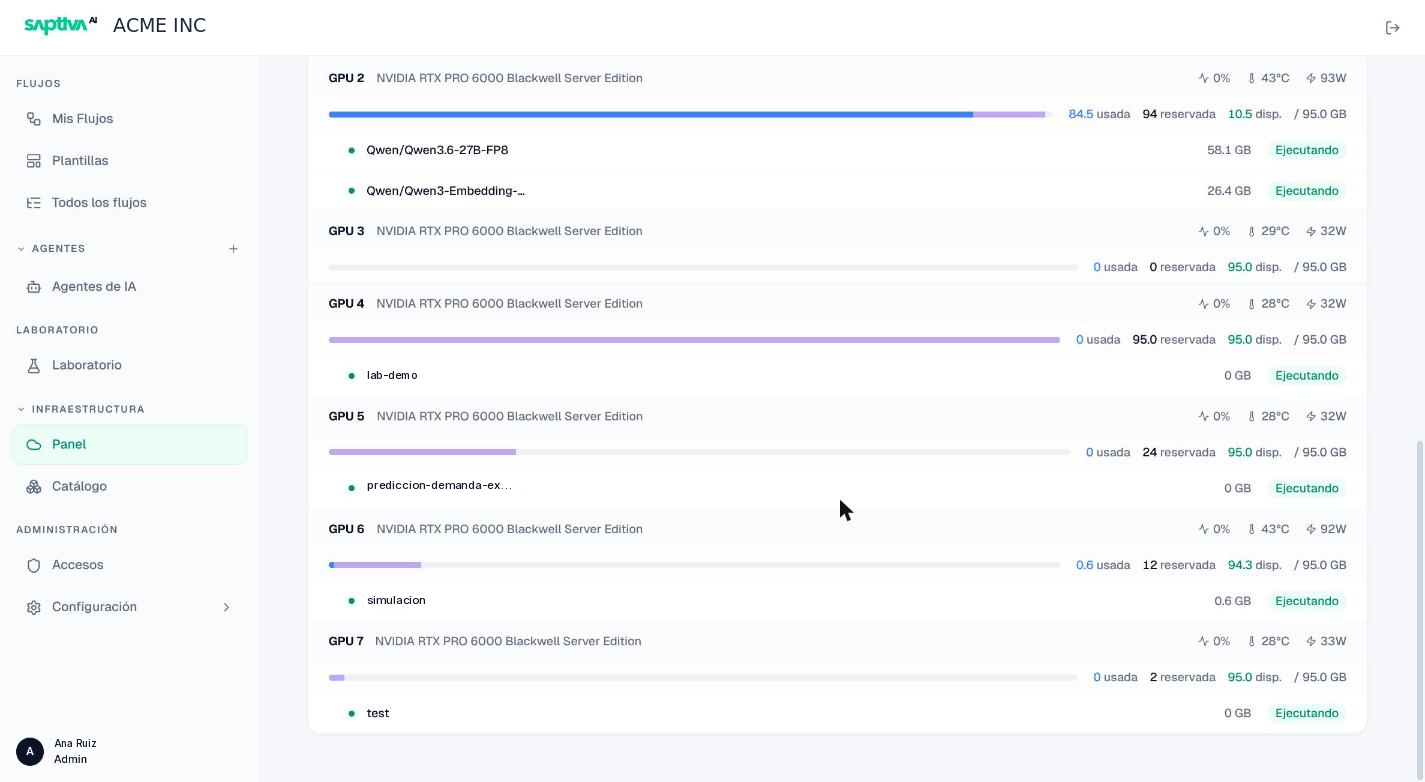
Below the cards, GPU Workloads groups the devices by node (for example saptiva-gpu-01 · 8 GPUs) and shows how many devices and regions there are. Each GPU shows:
- Card model, compute utilization, temperature, and power draw.
- A bar with usada (used), reservada (reserved), and disp. (avail.) memory over the total (
88.4 usada · 95.0 reservada · 6.7 disp. / 95.0 GB). - Below it, the workloads that occupy it: name, memory, and status.
| Workload status | Meaning |
|---|---|
| Ejecutando (Running) | Serving or working now. |
| Entrenando (Training) | A lab's training job. |
| Inactivo (Idle) | Reserved with no activity (a running notebook that is not in use). |
Model workloads also carry a type: Inferencia (Inference), Chat, Chat (réplica) (Chat replica), Embedding, Guard (content guard model), Code, Training, or Evaluación (Evaluation). Lab workloads carry the name of the lab or the notebook.
It answers "who has the GPU right now" and helps you spot the most expensive pattern: a GPU with high reservada and usada close to 0 GB is a lab running with no work.
Dashboard notices
| Message | What is happening | What to do |
|---|---|---|
| "Panel inicializándose, reintentando…" (Dashboard initializing, retrying…) | The telemetry aggregator has not published data yet (recent installation or restart). | Wait a minute and click Actualizar (Refresh). |
| "Una o más fuentes de telemetría están degradadas" (One or more telemetry sources are degraded) | A source (for example the NVIDIA one) is not responding; the numbers may be incomplete. | Report it to the operator if it lasts more than a few minutes. |
| "Snapshot antiguo: N s sin actualización" (Stale snapshot: N s without update) | The data you see is N seconds old. | Click Actualizar; if it persists, report it. |
| "No se detectaron GPUs" (No GPUs detected) | No GPU node is registered for the platform. | Contact the operator. |
| "sin telemetría" (no telemetry) on a GPU | That device stopped reporting. | Report it to the operator: it may be a node or driver that is down. |
Refresh
The dashboard does not refresh on its own. Use Actualizar to read the data again; the confirmation "Datos actualizados" (Data updated) appears at the bottom.