
Use InferNode from OpenCode
OpenCode is a coding agent that runs in the terminal: it reads your repository, proposes changes and runs commands. It accepts any provider compatible with the OpenAI API, so it can use InferNode models with your key, on your machine or inside a lab notebook.
Everything OpenCode needs fits in a configuration file and an environment variable. The key is never written in the file.
Before you start
- An InferNode key (
sk-saptiva-…). If you do not have one, ask your administrator or see Manage your key. - The InferNode base URL of your installation. It ends in
/infernode/v1, not in/v1. - OpenCode installed. Without administrator permissions, this is enough:
curl -fsSL https://opencode.ai/install | bash
opencode --version
The installer places the binary in ~/.opencode/bin; if the terminal does not find it, add that folder to the PATH.
1. Save the key in an environment variable
Create a file that only you can read and load it in each new terminal:
mkdir -p ~/.config/opencode
printf 'export INFERNODE_API_KEY="%s"\n' 'sk-saptiva-TU-LLAVE' > ~/.config/opencode/infernode.env
chmod 600 ~/.config/opencode/infernode.env
echo '[ -f ~/.config/opencode/infernode.env ] && . ~/.config/opencode/infernode.env' >> ~/.bashrc
source ~/.config/opencode/infernode.env
If you use zsh, replace ~/.bashrc with ~/.zshrc. Check that the key is loaded and that InferNode accepts it:
curl -s https://api.<tu-dominio>/infernode/v1/me -H "Authorization: Bearer $INFERNODE_API_KEY"
It should return your user and your organization. A 401 with identity.invalid_token almost always means that the variable is empty in that terminal; run source again.
2. Write the configuration
OpenCode reads ~/.config/opencode/opencode.json. This file declares InferNode as a provider and registers the models you want to see in the selector:
{
  "$schema": "https://opencode.ai/config.json",
  "model": "infernode/cortex",
  "small_model": "infernode/turbo",
  "provider": {
    "infernode": {
      "npm": "@ai-sdk/openai-compatible",
      "name": "InferNode",
      "options": {
        "baseURL": "https://api.<tu-dominio>/infernode/v1",
        "apiKey": "{env:INFERNODE_API_KEY}",
        "headerTimeout": 600000,
        "chunkTimeout": 600000
      },
      "models": {
        "cortex": {
          "id": "Saptiva Cortex",
          "name": "Saptiva Cortex (razonamiento y código)",
          "reasoning": true,
          "tool_call": true,
          "attachment": true,
          "temperature": true,
          "limit": { "context": 131072, "input": 74000, "output": 8192 },
          "cost": { "input": 0, "output": 0 }
        },
        "turbo": {
          "id": "Saptiva Turbo",
          "name": "Saptiva Turbo (rápido)",
          "reasoning": true,
          "tool_call": true,
          "attachment": true,
          "temperature": true,
          "limit": { "context": 262144, "input": 200000, "output": 8192 },
          "cost": { "input": 0, "output": 0 }
        },
        "omni": {
          "id": "Saptiva Omni",
          "name": "Saptiva Omni (herramientas y documentos)",
          "reasoning": true,
          "tool_call": true,
          "attachment": true,
          "temperature": true,
          "limit": { "context": 131072, "input": 74000, "output": 8192 },
          "cost": { "input": 0, "output": 0 }
        }
      }
    }
  }
}
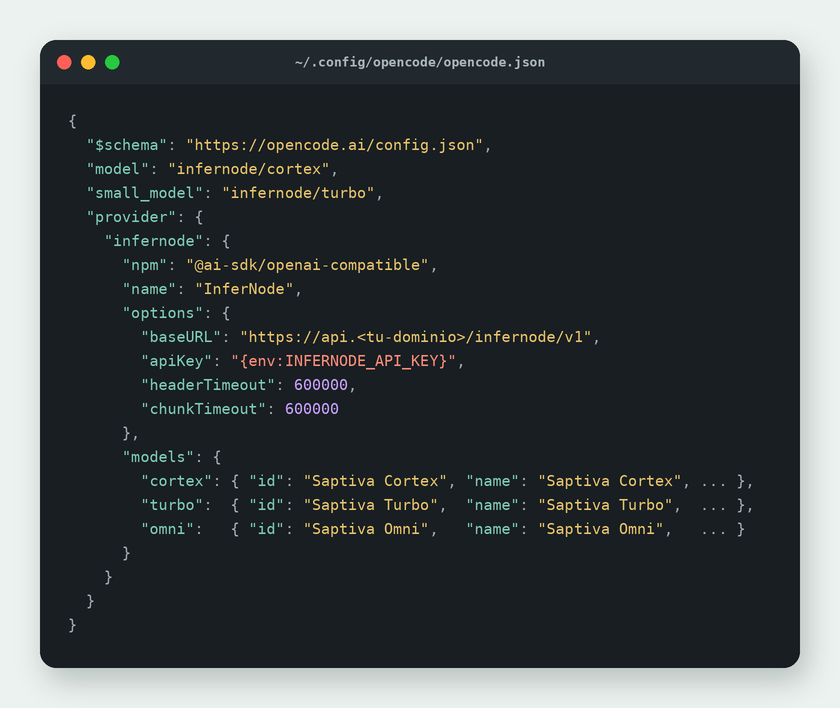
What each part does:
| Field | What it is for |
|---|---|
npm: "@ai-sdk/openai-compatible" | The generic adapter for OpenAI-compatible APIs. OpenCode downloads it automatically the first time it starts. |
options.baseURL | The InferNode base URL, with the /infernode/v1 suffix. |
options.apiKey: "{env:INFERNODE_API_KEY}" | Takes the key from the environment variable at startup. The file can be shared without exposing anything. |
headerTimeout, chunkTimeout | Ten minutes in milliseconds. Reasoning models take a while to emit the first token; with the default value, OpenCode cuts off the request before that. |
models.<alias>.id | The name InferNode knows the model by. Use the public alias (Saptiva Cortex): that way your configuration keeps working when the model behind it is updated. The Catalog name (Qwen3.6 35B A3B (FP8), with spaces and parentheses) only if you need that specific version (Choose a model: use the alias). |
models.<alias> (the key) | The short name you use for it in OpenCode: infernode/cortex. No spaces. |
limit.context, limit.input, limit.output | All three govern how much fits in a session and when OpenCode summarizes the history. They are not cosmetic, and the Catalog values do not work as is: see Choose the limits. |
cost | Set to zero: usage is metered in InferNode, not in OpenCode. |
model, small_model | The main model and the one OpenCode uses for small tasks (session titles, summaries). Putting the fast model in small_model saves tokens. |
These are three of the five aliases that ship by default. The other two are not configured here: Saptiva Embed produces vectors and Saptiva Guard moderates, and OpenCode does not use them as conversation models. GET /v1/models/aliases returns the ones in your installation, which may differ.
Choose the limits
Two rules of the node and one of OpenCode explain the numbers in the example.
The model's window is shared between the question and the answer. The context_window in the Catalog is not an input cap: it is the total of the prompt plus the max_tokens you request. A 131,072 model with max_tokens: 32000 accepts at most 99,072 prompt tokens, and requesting max_tokens: 131072 always fails, even with a four-token prompt.
A request lasts no longer than about five minutes. After that time, InferNode returns 504 with provider_timeout (InferNode is not responding). A reasoning model emits on the order of 46 tokens per second, so asking it for 16,000 response tokens runs out the time before it finishes. With 8,192 the generation takes about three minutes and fits with room to spare (Measured performance).
OpenCode never requests more than 32,000 response tokens. It sends the lower of your limit.output and 32,000, so declaring 131,072 does not change what goes over the network.
This leads to the most annoying effect: if limit.input is not declared, OpenCode summarizes the history when the session reaches limit.context minus that max_tokens, which is exactly the point at which the node starts rejecting the request. Declaring limit.input moves the summary down and leaves room for the summary itself to fit.
| Field | How to choose it |
|---|---|
context | The model's context_window, as is. OpenCode uses it for the context percentage it shows in the bar. |
input | The maximum prompt you accept. Leave it about 40,000 tokens below context minus output, so the summary and a couple of large file reads fit. |
output | 8,192. It fits within the request time and is more than enough for a working turn. |
With the example values, Saptiva Cortex summarizes the history at around 66,000 tokens and the node accepts prompts of up to 122,880. The difference between those two numbers is the safety margin.
GET /v1/models/{name} returns the model's context_window and max_output_tokens. The first is the total to share out; the second is the model's cap with a minimal prompt, not what you will be able to request in a long session.
Summary of the recommended configuration
The file above already has these values. This is the list of what to review when the models in the Catalog change.
| Setting | Value | Why |
|---|---|---|
model | The reasoning and code model | It is the one that sustains a working session with tools. |
small_model | The fast model | OpenCode uses it for titles and summaries; it delivers tokens four times faster. |
limit.context | The model's context_window | Feeds the context percentage in the bar. |
limit.input | About 40,000 tokens below context minus output | Brings the history summary forward and avoids hitting the window. |
limit.output | 8192 | Fits within the maximum time of a request. Raising it further changes nothing above 32,000. |
headerTimeout, chunkTimeout | 600000 | Ten minutes. Models that reason take a while to emit the first token. |
cost | Set to zero | Usage is metered in InferNode. |
And a habit that saves lost sessions: do not ask it to "read all the files" in a folder of large files. The model requests several reads in the same turn and the context can overflow the window all at once (Context exceeded).
3. Check that OpenCode sees them
opencode models infernode
It should list infernode/cortex, infernode/omni and infernode/turbo. The three short names and the test below were verified with OpenCode 1.18 against InferNode. That list comes from the file, not from the network: it confirms that the configuration is valid, not that the key works. For that, send a short request:
opencode run -m infernode/turbo "Responde solo: OK"
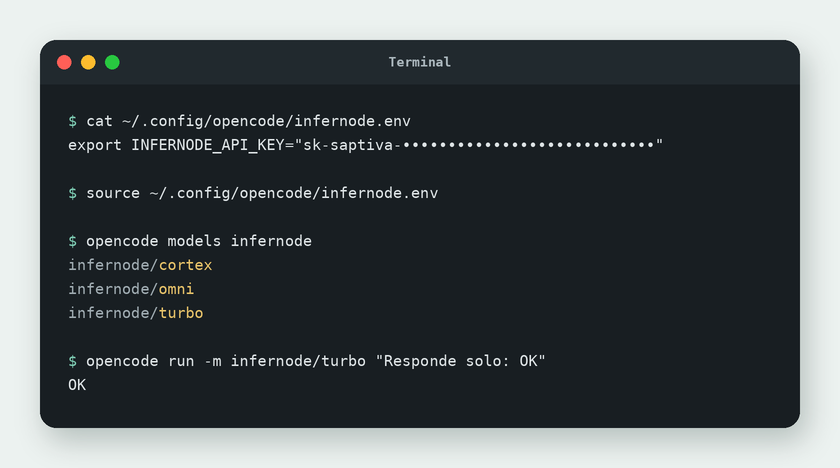
Inside the interactive interface (plain opencode), you change the model with /models; there the models appear with the name you set in the configuration.
Which model to use in OpenCode
| Task | Model | Why |
|---|---|---|
| Programming, refactoring, debugging | infernode/cortex | It is the deep reasoning and code model. |
| Quick questions, renaming, explaining a file | infernode/turbo | It responds in seconds and has the longest context. |
| Multi-step tasks with tools and documents | infernode/omni | The main model of Studio agents. |
Common errors
| Symptom | Cause | Solution |
|---|---|---|
401 or "Unauthorized" on the first message | The variable is not loaded in that terminal. | source ~/.config/opencode/infernode.env or open a new terminal. Verify with the curl to /me above. |
model_not_found | The id does not match what InferNode knows. | Copy the alias or the exact name from GET /v1/models, with spaces and parentheses. The name with a slash (Qwen/…) does not work. |
| The response arrives empty or is cut off | The model spent the max_tokens on reasoning and had nothing left for the text (finish_reason: length). | Raise limit.output up to 8,192 or use infernode/turbo. Above 32,000 it has no effect: OpenCode never requests more. The reasoning travels in the reasoning field of the response; see Control reasoning. |
| OpenCode finishes without writing anything and without an error | InferNode returned 504 with provider_timeout: the model did not respond in time or is not available at that moment. OpenCode does not show the error. | Confirm it with the curl on the API from code page using the same model: if it also returns 504, switch models (infernode/turbo) and report the request_id to your administrator (InferNode is not responding). |
400 with "maximum context length" | The prompt plus the max_tokens do not fit in the model's window, which is shared between the two. | Lower limit.output and declare limit.input (Context exceeded). |
| The session goes silent mid-task and does not come back | A turn read several large files and the context overflowed the window. OpenCode retries silently, with no message or log. | Close it with Ctrl+C. Request the files one at a time or use grep (Context exceeded). |
| A second OpenCode session is left waiting | Two simultaneous sessions on the same home folder block each other. | Wait for the first one to finish. |
| OpenCode cuts off the request after a few seconds | Default timeout with a model that thinks before writing. | Keep headerTimeout and chunkTimeout at 600000. |
| Everything was lost when the lab notebook restarted | Only your home folder persists. | That is why the configuration, the key and the binary live in the home folder. Run source again if you opened a new terminal. |
The same INFERNODE_API_KEY variable works for the OpenAI SDK, for curl and for OpenCode. If you rotate the key, update only the infernode.env file.