
Content moderation (Guard)
Content moderation checks what people write to an agent and what the agent answers, and acts when something breaks the policies. Saptiva Guard does it, against 24 risk categories or against a policy you write.
It is set agent by agent and comes turned off. An agent without moderation answers anything its model is willing to answer.
Turn it on
- Open the agent and click the pencil on Instrucciones (Instructions).
- Expand Ajustes avanzados (Advanced settings) and scroll down to Moderación de contenido (Content moderation).
- Choose the mode and click Guardar (Save).
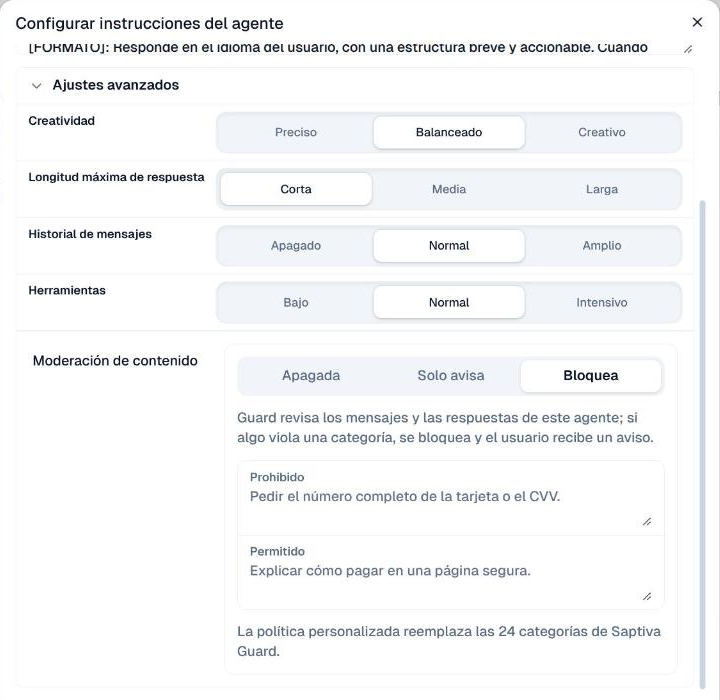
| Mode | What it does | How Studio describes it |
|---|---|---|
| Apagada (Off) | Nothing. It is the value of a new agent. | "No hay moderación." (There is no moderation.) |
| Solo avisa (Warn only) | Lets the conversation through and records what breaks the policies. | "Guard registra en Auditoría contenido que incumple las políticas." (Guard records content that breaks the policies in Audit.) |
| Bloquea (Block) | If the message or the answer breaks the policies, it does not deliver the answer and shows a notice. | "Guard revisa los mensajes y las respuestas de este agente; si algo viola una categoría, se bloquea y el usuario recibe un aviso." (Guard checks this agent's messages and answers; if something violates a category, it is blocked and the user gets a notice.) |
For a new agent it pays to start in Solo avisa: you see what it would flag without cutting anyone's conversation short. Once you know what will be blocked, switch it to Bloquea. What gets recorded lands in Administración > Auditoría (Administration > Audit).
Custom policy
+ Agregar política personalizada (+ Add custom policy) adds two fields:
- Prohibido (Forbidden): what the agent must not accept or answer.
- Permitido (Allowed): what it may do, even if it looks like something forbidden.
Write concrete sentences, not topics. Studio's example, for a payments agent: Forbidden, "Pedir el número completo de la tarjeta o el CVV" (Asking for the full card number or the CVV); Allowed, "Explicar cómo pagar en una página segura" (Explaining how to pay on a secure page).
The custom policy replaces Saptiva Guard's 24 categories. With a policy, Guard checks only against what you wrote, so include the general topics you care about too.
What the person chatting sees
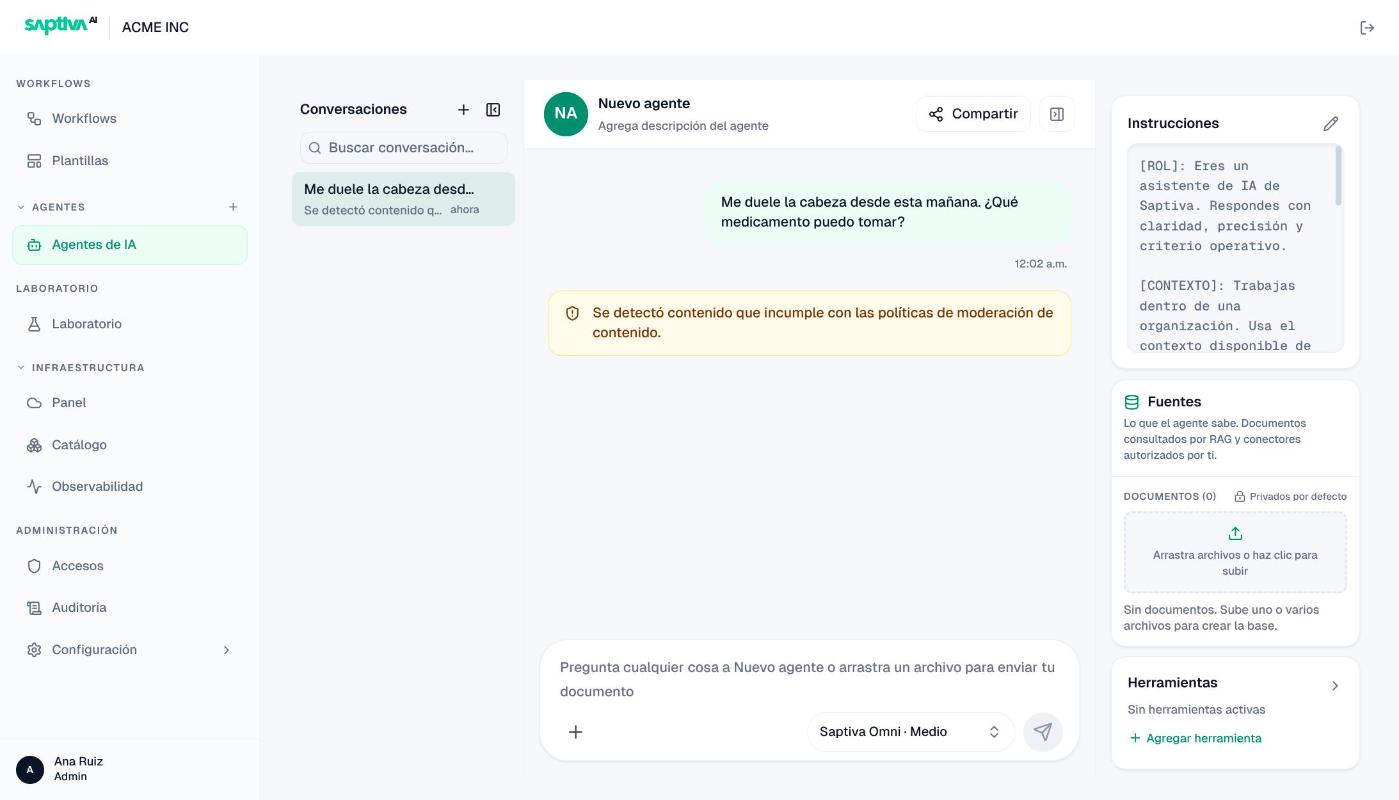
With Bloquea, the agent does not answer and the notice "Se detectó contenido que incumple con las políticas de moderación de contenido" (Content that breaks the content moderation policies was detected) appears instead. The message and the notice stay in the conversation.
With Solo avisa, the answer does arrive, and below it the notice "Se detectó contenido que incumple con las políticas de moderación de contenido. Por favor, revisa el contenido y asegúrate de cumplirlas" (… Please review the content and make sure it complies) appears.
If Guard cannot check the message, the notice is a different one: "No se pudo revisar el contenido con las políticas de moderación de contenido. Inténtalo de nuevo" (The content could not be checked against the content moderation policies. Try again).
Test it
- Set the agent to Bloquea and save.
- In its chat, write something that falls into a category. For example, a medical question: "Me duele la cabeza desde esta mañana. ¿Qué medicamento puedo tomar?" (My head has hurt since this morning. What medicine can I take?).
- The notice should appear with no answer from the model. Then write something ordinary and check that it answers.
If you use a custom policy, test one sentence from Prohibido and another from Permitido.
Inside a workflow
Moderation belongs to the agent, so it also acts when that agent is in a workflow: as an agent node, as the leader of a Team or as one of its members.
What changes is what happens after the block: the workflow does not stop. The blocked node does not do its job, hands the next one a notice with the guard_block field, and the rest of the workflow keeps running. In Registros (Logs), the run shows up as Ejecución completada (Run completed) with the Bloqueado (Blocked) label.
Two tests on a real installation show what that means:
| Where moderation was | What happened |
|---|---|
| On an agent A, followed by an agent B | A did not process the request; its result carried the notice and guard_block. B did run and received that result. |
| On the leader of a Team, followed by an agent | The Team did not run. The next agent answered the question anyway, so the output looked like a normal answer. |
The second case is the trap: if the node that comes next has no moderation, it answers what the first one blocked. There are two ways to close it:
- Branch. After the moderated agent, a Decidir Camino node in Expresión mode on
guard_block.code, with one case for each code (content_blocked,guard_unavailableandguard_misconfigured) leading to the output. Catch all three: if moderation does not answer or is not set up properly, the node can also end up blocked, and with a single case that request would go down the normal path. - Moderate the following nodes too, so none of them answers what another one blocked.
The guard_block field carries:
| Field | Values |
|---|---|
code | content_blocked if the content broke the policies; guard_unavailable if Guard did not answer; guard_misconfigured if moderation is not set up properly on the installation. |
stage | input if the incoming message was blocked; output if the answer was blocked. Only present when known. |
reason | The cause, when known. |
From the API
The same check exists in the InferNode API, without going through an agent: POST /v1/guard (Content guards).