
Decidir Camino: branch a workflow
Decidir Camino (Decide path) is the node that splits a workflow. It looks at what comes from the previous step and sends it out through one of several outputs. It does not change the data: it only decides where it goes.
Use it when the input can be of several kinds and each one is handled differently. For example, a complaint goes to one agent and a question to another; an accepted document moves on and a rejected one goes back; a message that moderation blocked gets a fixed reply.
Add it to the canvas
It is not loose in the palette: it comes as a template.
- In Construir (Build), open Componentes > Plantillas > Cómo decide el agente (Components > Templates > How the agent decides) and drag Decidir Camino onto the canvas. You can also find it by typing "Decidir" in Buscar componente... (Search component).
- In an empty workflow, the template builds three connected nodes: Entrada interna (Agents) (Internal input), Decidir Camino and Salida interna (Agents) (Internal output).
- Click the node to open its panel on the right.
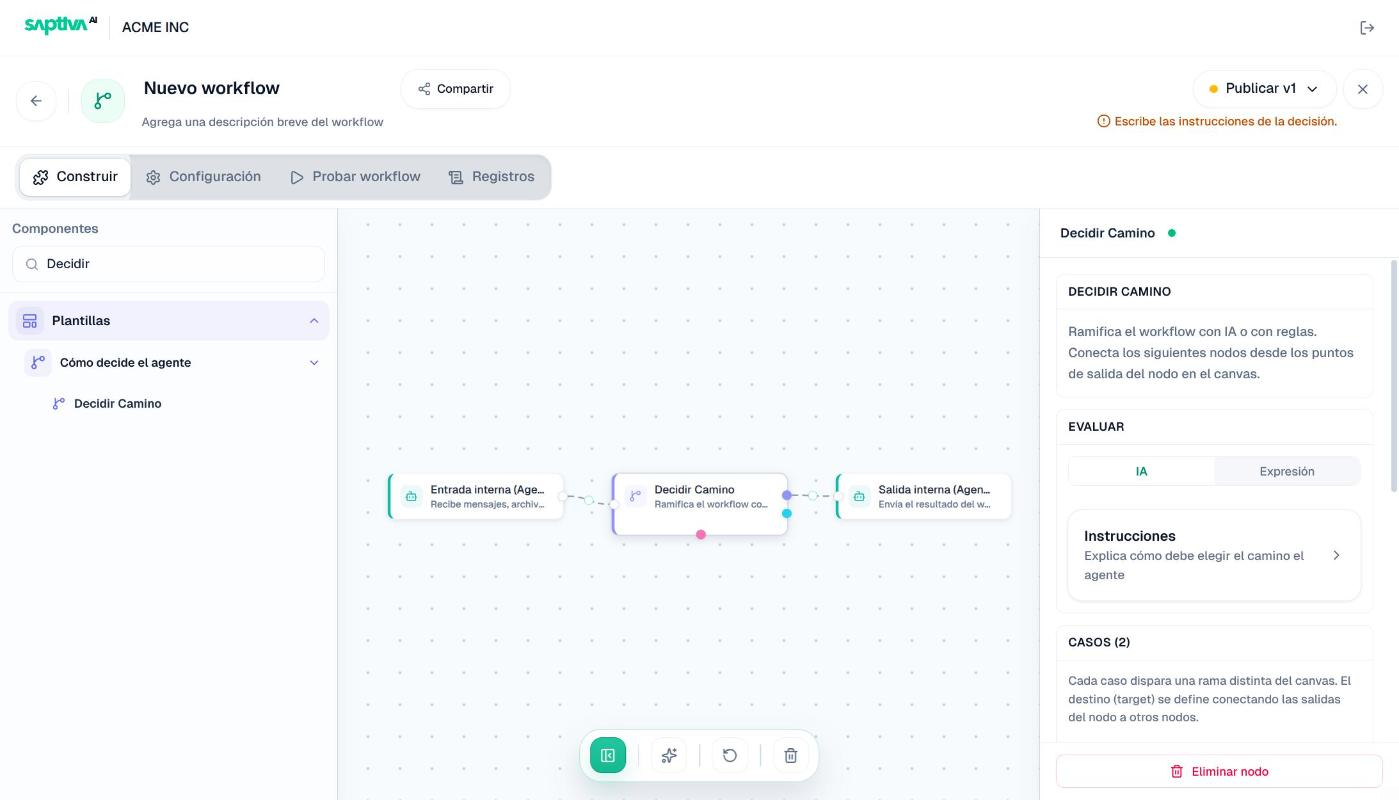
The node has one colored output per case and one more for the default path. In the image, the purple output (default) already goes to Salida interna and the outputs of the two cases are not connected yet.
Choose how it decides
EVALUAR (Evaluate) has two modes:
| Mode | How it decides | Use it when |
|---|---|---|
| IA (AI) | A model reads the input and picks a path by following your instructions. | The rule is said in words: "if they complain about a charge", "if the message sounds urgent". |
| Expresión (Expression) | It reads a field of the input JSON and compares it with the value of each case. | The previous step already left the answer in a field, such as veredicto, categoria or guard_block.code. |
Expresión does not make a model call and always gives the same result for the same input. Prefer it when the data already exists; use IA when you would need a model to get it.
Switching modes asks for confirmation and, when you click Cambiar (Switch), Studio erases the values of the paths. If you leave IA, it also erases the instructions and the model.
IA mode
- Click the Instrucciones (Instructions) card. Configurar la decisión con IA (Configure the AI decision) opens.
- In MODELO (Model), keep Usar el modelo recomendado (Use the recommended model) or pick one from the list.
- In PROMPT, explain when to take each path by its name. Below the box, Studio repeats the names under "Menciona cada camino en el prompt" (Mention each path in the prompt).
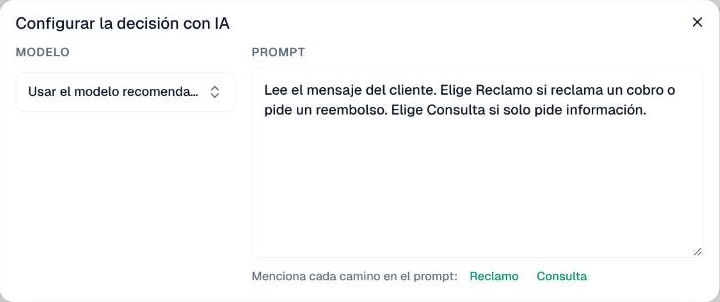
The example Studio suggests: "Lee el mensaje del cliente. Elige Camino1 si reclama un cobro o pide un reembolso. Elige Camino2 si solo pide información" (Read the customer's message. Choose Camino1 if they complain about a charge or ask for a refund. Choose Camino2 if they only ask for information). If the prompt does not name some path, the editor header warns: "Las instrucciones de la decisión no mencionan: Camino1, Camino2. Explica cuándo tomar cada camino" (The decision instructions do not mention: Camino1, Camino2. Explain when to take each path).
Give each case a name that means something, such as Reclamo (Complaint) or Consulta (Question), instead of Camino1. You type the name in the panel, in each case's box, and it is the one the prompt uses.
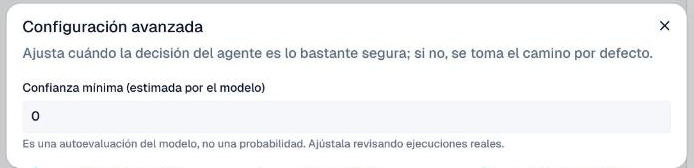
Minimum confidence. In Configuración avanzada (Advanced settings) you set, from 0 to 1, how sure the decision has to be; below that, the workflow takes the default path. It starts at 0, so at first confidence never diverts anything. Studio warns that "Es una autoevaluación del modelo, no una probabilidad" (It is the model's self-assessment, not a probability): raise it little by little, reviewing real runs in Registros (Logs).
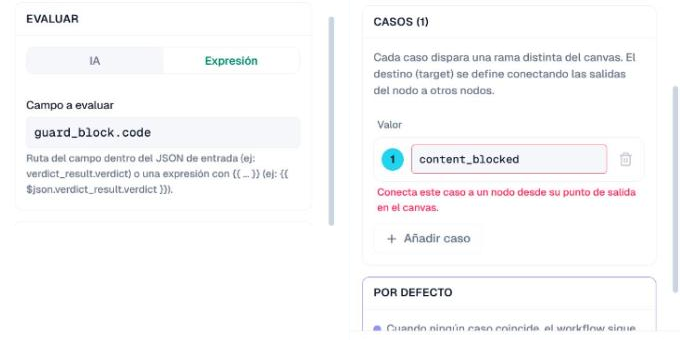
Expresión mode
- In Campo a evaluar (Field to evaluate), type the path of the field inside the input JSON, such as
verdict_result.verdict, or an expression, such as{{ $json.verdict_result.verdict }}. - In each case, type the expected Valor (Value). The cases cannot be edited until there is a field: "Escribe el campo a evaluar para editar los casos" (Type the field to evaluate to edit the cases).
The case is taken when the field has that value. Case does not matter (Aceptado and aceptado match) and numbers are compared as numbers.
Cases and the default path
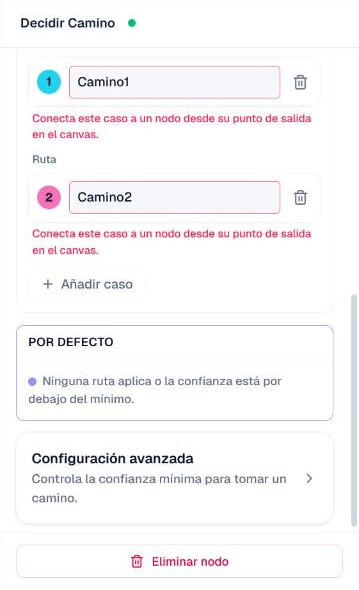
- Each case is a branch. Añadir caso (Add case) adds another one and the trash can removes it.
- The destination is set on the canvas, not in the panel: drag from the case's output point to the next node. An unconnected case is marked in red ("Conecta este caso a un nodo desde su punto de salida en el canvas", Connect this case to a node from its output point on the canvas) and blocks publishing.
- POR DEFECTO (Default) is the branch for whatever does not fit. In IA it is taken when "Ninguna ruta aplica o la confianza está por debajo del mínimo" (No path applies or the confidence is below the minimum). In Expresión, Studio says "Cuando ningún caso coincide, el workflow sigue por la rama por defecto (si está conectada) o continúa sin ramificar" (When no case matches, the workflow follows the default branch, if it is connected, or continues without branching); in practice, if nothing matches and the default path is not connected, the run does not continue: it stops at this node with an error.
Always connect the default path. It is the one that receives the input you did not expect, and if it leads to no node, that run fails instead of carrying on.
Example: reply differently when moderation blocks
When content moderation blocks an agent inside a workflow, the workflow does not stop: the next node receives the block notice in the guard_block field. To handle that input differently:
- After the agent, add Decidir Camino in Expresión mode.
- In Campo a evaluar, type
guard_block.code. - Create one case per block code:
content_blocked(the content broke the policies),guard_unavailable(moderation could not check) andguard_misconfigured(moderation is not set up properly). Connect all three to the branch for blocked content; for example, straight to the output, which delivers the notice. - Connect the POR DEFECTO path to the rest of the workflow.
All three cases matter: with any of those codes the agent did not do its job, and if you only catch content_blocked, a moderation failure can send the request down the normal path. That way, a blocked request ends with the notice and the others carry on.
When something fails
| What you see | Cause | What to do |
|---|---|---|
| "Escribe las instrucciones de la decisión." (Write the decision instructions.) | IA mode without a prompt. | Open Instrucciones and write the prompt. |
| "Las instrucciones de la decisión no mencionan: …" (The decision instructions do not mention: …) | The prompt does not name every path. | Use each case's exact name in the prompt. |
| "Escribe el campo a evaluar para editar los casos." (Type the field to evaluate to edit the cases.) | Expresión mode without a field. | Type the path in Campo a evaluar. |
| "Este caso necesita un valor esperado." (This case needs an expected value.) | An Expresión case is empty. | Type its value or remove it. |
| "Conecta este caso a un nodo desde su punto de salida en el canvas." | A case leads to no node. | Drag from its output point to the next node. |
| The cases or the prompt disappeared. | The mode was switched and Cambiar was confirmed. | Set them up again in the right mode. |
| The run fails at the Decidir Camino node. | No case matched and the POR DEFECTO path is not connected. | Connect the default path to a node. |
| Almost everything falls into the default path. | In IA, Confianza mínima (Minimum confidence) is too high; in Expresión, the value does not match what the field carries. | Check in Registros what reached the node and adjust. |