
Cost and metrics
For the published version, the Resumen (Summary) tab in the workflow details shows four cards, a chart, and a resources block.
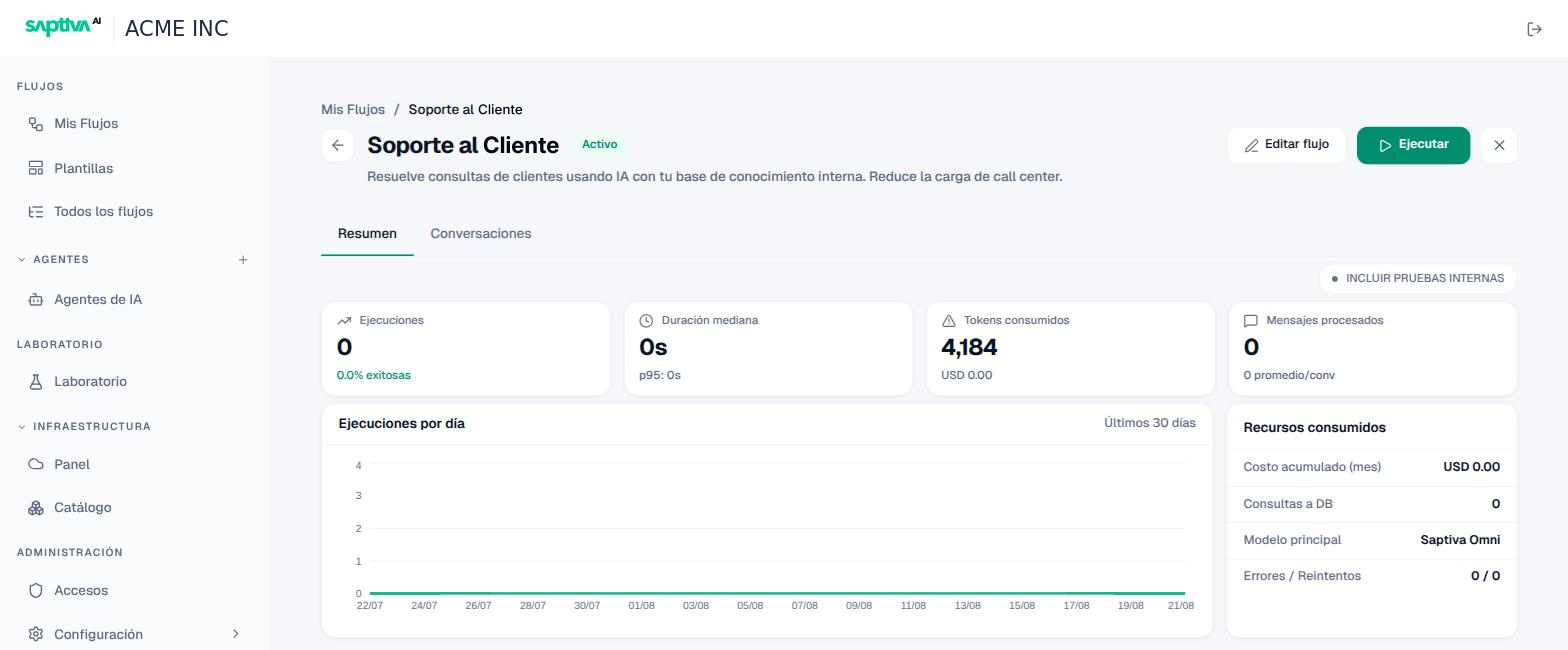
Cards
| Card | What it measures | How to read it |
|---|---|---|
| Ejecuciones (Runs) | Total and percentage of successful runs. | A low percentage with high volume is a channel receiving inputs that the workflow does not understand. |
| Duración mediana (Median duration) | Median and p95 per run. | If the p95 is much higher than the median, some runs are waiting on a slow model or tool; look at it in the Timeline. |
| Tokens consumidos (Tokens consumed) | Tokens and their equivalent in USD. | This is the model cost for the period. |
| Mensajes procesados (Messages processed) | Total and average per conversation. | Long conversations consume more history per call. |
Runs per day
Chart of the últimos 30 días (last 30 days). An unexplained spike in a workflow with a webhook is usually an external system retrying.
Resources consumed
- Costo acumulado (mes) (Accumulated cost, month): what this workflow has cost in the current month, based on the models and providers used.
- Consultas a DB (DB queries): database calls made by nodes or tools.
- Modelo principal (Main model): the model that consumed the most tokens.
- Errores / Reintentos (Errors / Retries): how many runs failed and how many were retried.
Include internal tests
The Incluir pruebas internas (Include internal tests) toggle adds or excludes the runs from the Probar flujo (Test workflow) tab. Leave it off to read the real production cost.