
Nodes and components
The left panel of the Construir (Build) tab is called Componentes (Components). Everything you can place on the canvas comes from there; drag the item onto the canvas and connect it. Your installation publishes the catalog, and it can vary between Clients and between versions; this page describes the one in Studio 2.49 and was checked against the real panel, not against the internal catalog.
Buscar componente (Search component) does not find items by the name you see. Typing "modelo", "documento", or even "Nodos de IA" returns nothing, even though those texts are on screen. Expand the groups instead of searching.
The five groups in the panel
| Group | What it contains | When you use it |
|---|---|---|
| Componentes | Crear agente (Create agent); Mis agentes (My agents), paginated and with a Míos (Mine) / Compartidos conmigo (Shared with me) filter; and Mis teams (My teams). | Always: the agent is the core of almost any workflow. |
| Equipos (Teams) | The four team patterns: Trabajo repartido (Split work, Coordinar), Expertos en el tema (Subject-matter experts, Enrutar), Todos a la vez (All at once, Difundir), Lista de tareas (Task list, Tareas). | When a single agent is not enough (Agent teams). |
| Plantillas (Templates) | Qué hace el agente (What the agent does): Leer documentos (Read documents), Filtrar información (Filter information), Validar información (Validate information); Qué hace el team (What the team does): Soporte a cliente (Customer support), Investigación (Research), Panel multi-área (Multi-area panel), Pipeline de contenido (Content pipeline); and Cómo decide el agente (How the agent decides): Decidir Camino (Decide path). | To start with instructions that are already tested and only change the context. |
| Canales (Channels) | Conecta con tus Agents (Connect your Agents), Conecta con tus apps (Connect your apps, the webhook), and Conecta con WhatsApp (Connect with WhatsApp). | Every workflow needs at least one input and one output (Triggers). |
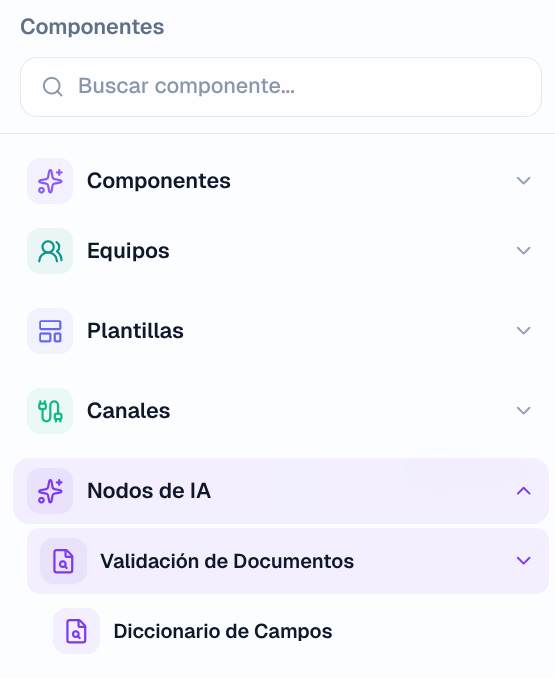
| Nodos de IA (AI nodes) | Validación de Documentos (Document validation), and inside it Diccionario de Campos (Field dictionary). | Document extraction and validation workflows. |
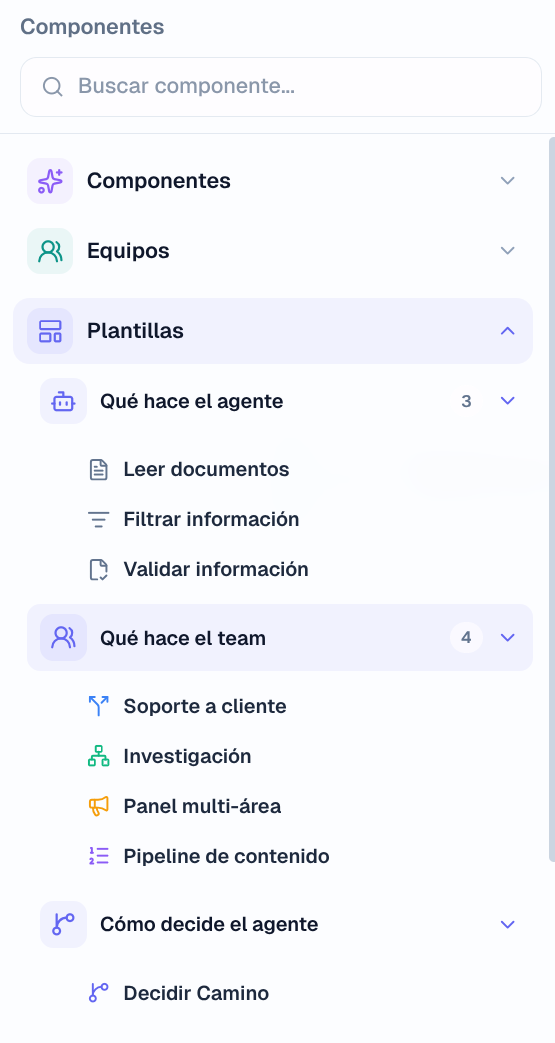
The groups start collapsed and you expand them one by one. Nodos de IA has one more level: the node is inside Validación de Documentos, not directly under the group.
What is not in the panel
Three things that people look for here and will not find:
- A standalone model node. There is no way to place a model on the canvas without an agent around it. The LLM-type nodes you see in an existing workflow come from a template.
- Creating a team from the panel. You can drag one that is already saved from Mis teams, or start from a pattern in the Equipos group, but there is no blank "create team".
- Standalone flow-control nodes (condition, human review). They come with the templates that use them; they are described below because you will see them on the canvas even though you cannot take them from the panel.
How to read a node on the canvas
Each card shows an icon, the name, a line of description, and a type label in uppercase. The dots on the sides are its connectors: almost all nodes have one input (main) and one output (main); channel inputs only have an output, and channel outputs only an input. When you click a node, the right panel shows its configuration, with a green dot when it is complete; Eliminar nodo (Delete node) removes it from the canvas, and Desconectar nodo (Disconnect node) only breaks its connections. ¿Eliminar todos los nodos y conexiones del flujo? (Delete all of the workflow's nodes and connections?) is the confirmation for the clear-canvas button.
| Label | Node |
|---|---|
| ENTRADA (INPUT), SALIDA (OUTPUT), CONEXIÓN (CONNECTION), WEBHOOK | Canales |
| AGENTE (AGENT), EQUIPO (TEAM), LLM | Componentes |
| APROBACIÓN (APPROVAL), CONDICIÓN (CONDITION), TRANSFORM, HERRAMIENTA (TOOL), PROGRAMACIÓN (SCHEDULE) | Flow-control nodes, which come with the templates |
Node reference
Recibir solicitud (Receive request, ENTRADA)
Start of the workflow. "Recibe mensajes, archivos y datos" (Receives messages, files, and data) through the channel it has configured: it appears as Recibir solicitud · Webhook, · WhatsApp, or Entrada interna (Agents) (Internal input). What comes in (text, attached files, fields from the webhook JSON) becomes the input of the next node. A workflow can have more than one input; each run starts in only one.
Connect next: an Agent, a Team, a Condition, or the output directly (for echo or test workflows).
Modelo de IA (AI model, LLM)
"Genera contenido con un modelo" (Generates content with a model): a call without persistent instructions, without Sources, and without tools. You configure the modelo (model) and, if it is external, the credencial (credential). It is the cheapest node, and it is useful for classifying, summarizing, translating, or reformatting between two steps. It can connect to an Agent or a Team as its model (its output connector is called ai_model).
You cannot take it from the Componentes panel: it appears in workflows that come from a template. If you need one and your workflow does not include it, use an agent without Sources or Tools, which does the same thing at a slightly higher cost per call.
Agente (Agent, AGENTE)
"Procesa información con instrucciones" (Processes information with instructions). When you select it, the panel shows three tabs: Agente, with the system prompt, the Modelo (Model) section, and Base de conocimiento (Knowledge base); Herramientas (Tools), for example to add Web Search or OCR Vision to that node, where for OCR Vision you choose the vision model it will use "solo en este flujo" (only in this workflow); and Config. An agent created with Crear agente is private to the workflow and does not appear in Agentes de IA (AI Agents); one dragged from Mis agentes is shared with all the workflows that use it.
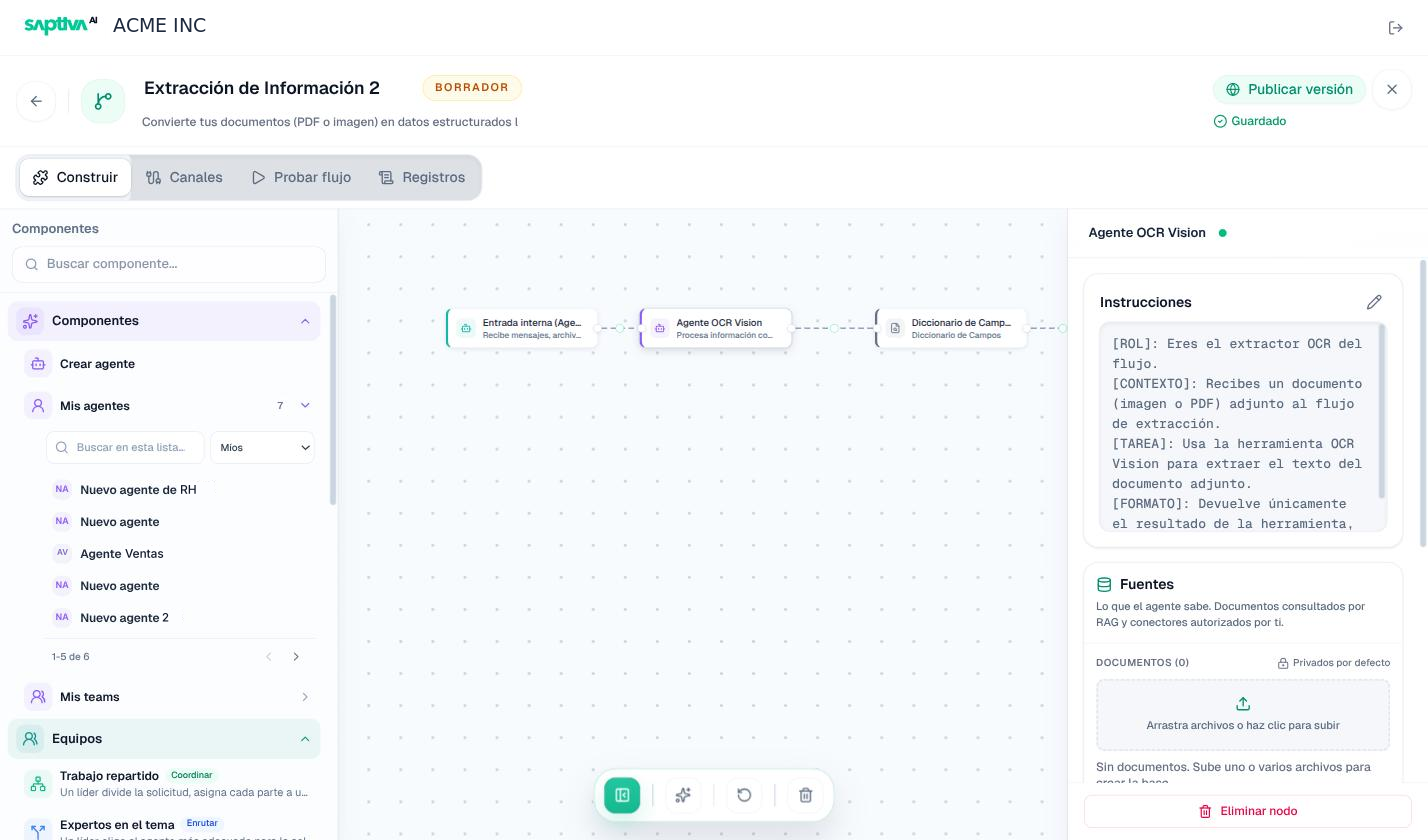
Connect next: a Condition (to decide based on its response), a Human review, or the output.
Team (EQUIPO)
"Equipo privado de este flujo" (Team private to this workflow). The card shows its members (A1, A2...). In the panel: Agentes del equipo (Team agents), with Añadir agente (Add agent) and the option to select an agent to configure it; the team's Instrucciones (Instructions); Fuentes (Sources), where document management per team is announced as coming soon; Herramientas; and Ajustes avanzados (Advanced settings), with the team's creativity, length, and tool use. The strategy (Coordinate, Route, Broadcast, Tasks) comes from the pattern you chose in the Equipos group.
Connect next: the same as for an Agent.
Condición (Condition, CONDICIÓN)
"Ramifica el flujo. Lee algo del JSON que viene de arriba y decide por qué salida sigue." (Branches the workflow. It reads something from the JSON coming from above and decides which output to follow.) It has three modes:
| Mode | How to configure it | When |
|---|---|---|
| Reglas (Rules) | Field, operator, and value (for example categoria is equal to facturacion). | The decision depends on a specific field of the previous output. |
| Expresión (Expression) | Logic with AND and OR over several fields. | Several combined conditions. |
| IA (AI) | A model evaluates a condition written in natural language. | The rule cannot be expressed with fields ("the message sounds urgent"). |
Each case has its own output on the canvas, color-coded since version 2.48; a case without a connection is marked in red and blocks publishing. The node does not modify the data: it only decides where the data goes.
Connect next: on each branch, a different Agent, a Transformation, a Human review, or the output.
Human Review (APROBACIÓN)
"Pausa el flujo y deja que un humano revise." (Pauses the workflow and lets a human review.) It receives the JSON from the previous step and shows its fields so that a person approves or rejects each one; meanwhile, the run stays Pausado (Paused) ("esperando revisión", waiting for review) and appears in the Probar flujo (Test workflow) tab (or in the Dictamen (Ruling) view, in ruling workflows) with the list of fields. When it is resolved, the node emits the same JSON with the decision for each field. It does not branch: if you want a rejection to take another path, put a Condition after it.
In the configuration you decide which fields are shown and how; who reviews, and the approval or rejection, happen at run time. Default values: the title "Human review required" and the result in the wait_result field.
Connect next: a Transformation or the output; a Condition if there are two paths.
Enviar resultado (Send result, SALIDA)
End of the workflow. "Envía el resultado del flujo" (Sends the workflow's result) through the corresponding channel: an HTTP response to the webhook, a WhatsApp message to the contact (if you turned on the automatic reply), or Salida interna (Agents) (Internal output) to the agent that ran it. What reaches this node is exactly the output Payload you see in Registros (Logs). It has no output.
Diccionario de Campos (Field dictionary, Nodos de IA)
"Extrae campos estructurados del texto del documento según un catálogo editable por tipo de documento." (Extracts structured fields from the document's text according to an editable catalog per document type.) It works in three steps: it resolves the template according to the document type (factura, ticket, acta_constitutiva, or default), applies a regular expression per field when there is one (deterministic, without a model), and makes a single model call only for the fields that were not resolved.
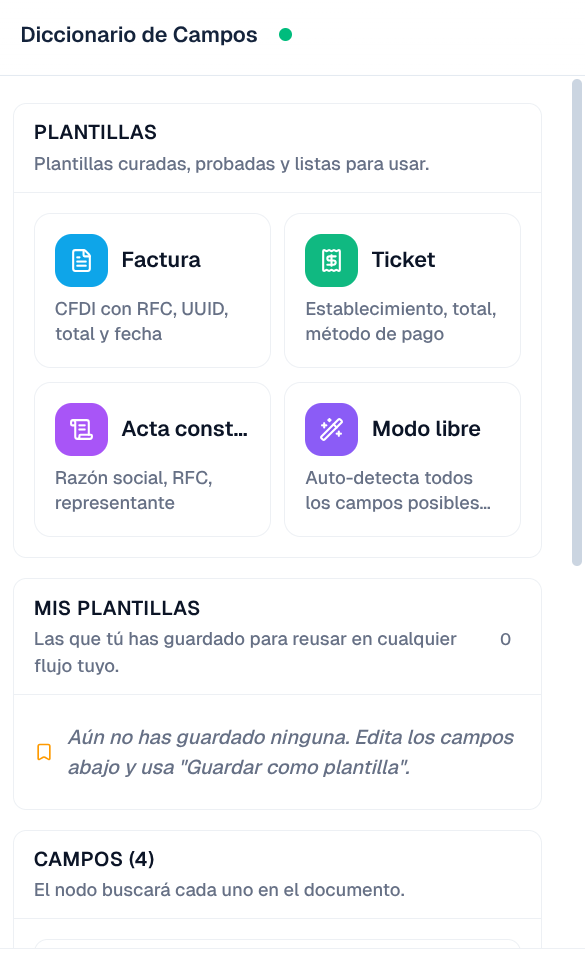
Its panel offers:
- Modo libre (Free mode): "el modelo lee el documento y extrae todos los campos que encuentre" (the model reads the document and extracts all the fields it finds), without a template or document type. Useful for exploring a new document; less predictable.
- Curated Plantillas: Factura (Invoice: CFDI with RFC, UUID, total, and date), Ticket (Receipt: establishment, total, payment method), Acta constitutiva (Articles of incorporation: legal name, RFC, representative).
- Mis plantillas (My templates): the ones you saved with Guardar como plantilla (Save as template) to reuse in any of your workflows; the list shows how many fields each one has and which one is En uso (In use).
- Campos (N) (Fields, N): the editable list; Agregar campo (Add field) and delete.
- Modelo (optional, under advanced): the model that extracts the fields without regex; if you do not choose one, the recommended one is used.
Put before it an agent with OCR Vision (or a document with text), because this node works on text that is already extracted. Connect next: a Condition (validate fields), a Human review, or the output in JSON.
Dictaminación (Ruling; Nodos de IA, only in some Clients)
It does not appear in the panel unless your Client has the Saptiva Extractor credential, which the organization manages. If the Nodos de IA group only shows you Validación de Documentos, you do not have it.
It evaluates a case file against Reglas written in natural language ("degree related to Engineering"), each one Obligatoria (Required) or Opcional (Optional), and against Consistencia entre documentos (Consistency across documents) fields that must match deterministically (name or legal name, exact identifier, RFC, date, amount, date range). It comes with example Rubros (Categories): position or hiring, service provider, graduation, contracts, bonds; and it lets you save your own in Mis plantillas. It delivers an ACEPTADO (accepted) or RECHAZADO (rejected) Dictamen (Ruling) with the result per rule, how each one was evaluated, and the reasons. It is the basis of the Validación de Documentos template.
Advanced nodes
The templates that use them include them; you do not take them from the Componentes panel, and in most workflows you do not need to configure them by hand.
| Node | Label | What it does |
|---|---|---|
| Transformación (Transformation) | TRANSFORM | Changes or adds JSON fields between two nodes (field = value assignments). |
| Solicitud HTTP (HTTP request) | HERRAMIENTA | Calls an external service: method, URL, headers, body, timeout (30 s by default), and retries; it saves the response in a field (http_response). It is the node with an external effect par excellence: put a Human review before it while the workflow is new. |
| Horario (Schedule) | PROGRAMACIÓN | Starts the workflow with a calendar expression (0 * * * * = every hour). Its runs appear with the source Programado (Scheduled). |
| Nota (Note) | Visual only: a title and text to document the canvas; it does not run. | |
| Webhook legado (Legacy webhook) | WEBHOOK | Input from earlier versions, marked as deprecated since July 2026; Studio migrates it to the Conecta con tus apps channel. |
What to connect after each node
The editor suggests the next node based on the one you just placed. It is the same table that Studio uses:
| After... | Suggestions |
|---|---|
| Input or Schedule | Agent, Condition, Transformation, HTTP request, Output |
| Agent or Team | Condition, Human review, Output |
| Condition | Transformation, Human review, Output |
| Transformation | HTTP request, Human review, Output |
| HTTP request | Condition, Output |
| Human review | Transformation, Output |
| Output | Nothing: it is the end |